From a GPX
to a rally roadbook.
Load a track and the HUB draws the tulips, the CAP headings and the distances for you. Fine-tune each row with the symbols rally riders know, ride it under FIA or Training / Club rules, and take it out as an OpenRally GPX or a PDF roll. Share it with a link, and ride it in DMD2.
One click from track
to roadbook.
Start from a GPX in your HUB GPX Manager, a file from your computer, or draw the route on the map, snapped to the roads. Press Generate: a row at each junction and bend that matters, each with its tulip, CAP heading, partial and total distance, and a start and a finish. A route planned in the Trip Planner brings its own turn instructions.
Load or draw
My GPX, a file, or the map.
Generate
Rows, tulips, CAP and distances.
Refine
Symbols, notes and waypoints.
Rules and check
FIA or club rules, then OpenRally, PDF or DMD2.

Generated: every row on the map, and the roadbook beside it.

The row editor: the tulip, and the ready tulips to pick from. Symbols and waypoint badges are one tab away.
Draw it like
a rally roadbook.
- The tulip: freehand, lines, roads and text in any colour, with six road styles from motorway to footpath. Redraw it from the track at any time.
- Symbols: ready tulips, FIA / FIM-style symbols and waypoint badges by category, and your own SVG, PNG or JPG.
- Details: a name, the waypoint type, CAP, danger from 0 to 3, a speed limit, open and clear radius, fuel, coordinates, and notes.
- Distances: the total is worked out for you, with a partial on every row.
- The map: satellite or topo, undo and redo, a magnifier on Z, and several rows deleted at once.
The rally waypoint types.
Speed zones get the orange side bars and controls the pink frame, on screen, in the PDF and in DMD2.
Race rules or club rules.
Paper or screen.
Decide how strict the roadbook is before anyone rides it, check it for mistakes, and take it out as an OpenRally GPX or a PDF.

Rules travel with the roadbook: FIA Compliant, or Training / Club with the extras you tick.

PDF three ways. The GPX button saves the OpenRally file.
FIA Compliant
The race setting, locked: the rider navigates by the roadbook alone.
Training / Club
Choose the map, the visible path, the rider's own position, radii, revealed waypoints, voice cues, speed-zone penalties, a practice chrono, navigate-to-point and an off-course warning.
Check
Lists what is wrong before the start: distances going backwards, a missing start or finish, a missing CAP, rows with no position.
PDF, three ways
A4 pages, 148 mm roll pages, or one continuous roll for your roadbook holder.
OpenRally GPX
Download the roadbook as an OpenRally file for other rally apps and devices.
Duplicate and edit
Copy a roadbook for next year's edition, or a shorter version, and change only what changed.
Your roadbooks,
in one place.
Every roadbook you make is kept in Roadbooks on your HUB account, beside your HUB GPX Manager: in folders, with your OpenRally files and the PDFs you upload. Edit, download, duplicate, move, rename, or replace a PDF.
- Locked links stay in sync with your copy, need no download and can be taken back: fix a row and every rider has the fix.
- Download links hand over a copy to keep and edit.
- Either can start and end on a date and stop after a number of riders.
- Publish to the Roadbooks catalogue: riders find it on a map with filters and reviews and add it to theirs, without seeing the rows or the route first.
Upload a plain GPX in Roadbooks and it offers to make a roadbook from it.

Roadbooks: folders, OpenRally roadbooks and PDFs.

Share a roadbook: pick the rules.

Every link you made, with its riders.

Find roadbooks other riders share: the Roadbooks catalogue, on a map, with filters.
Ride it in DMD2.
In DMD2, Open file › from DMD HUB lists your roadbooks and the ones shared with you. The roadbook opens in DMD2's Roadbook, kept on the unit for offline riding, with the rules you set.

The roadbook in DMD2 on a DMD T880.

Open file › From DMD HUB: your HUB roadbooks on the unit.
Waypoints validated
DMD2 validates the waypoints as you reach them and counts the penalties, with a chrono.
Speed zones
The zone shows on the roadbook as you ride it, with the limit you set.
Rules applied
The Training / Club choices, and the map blocked when the rules say so.
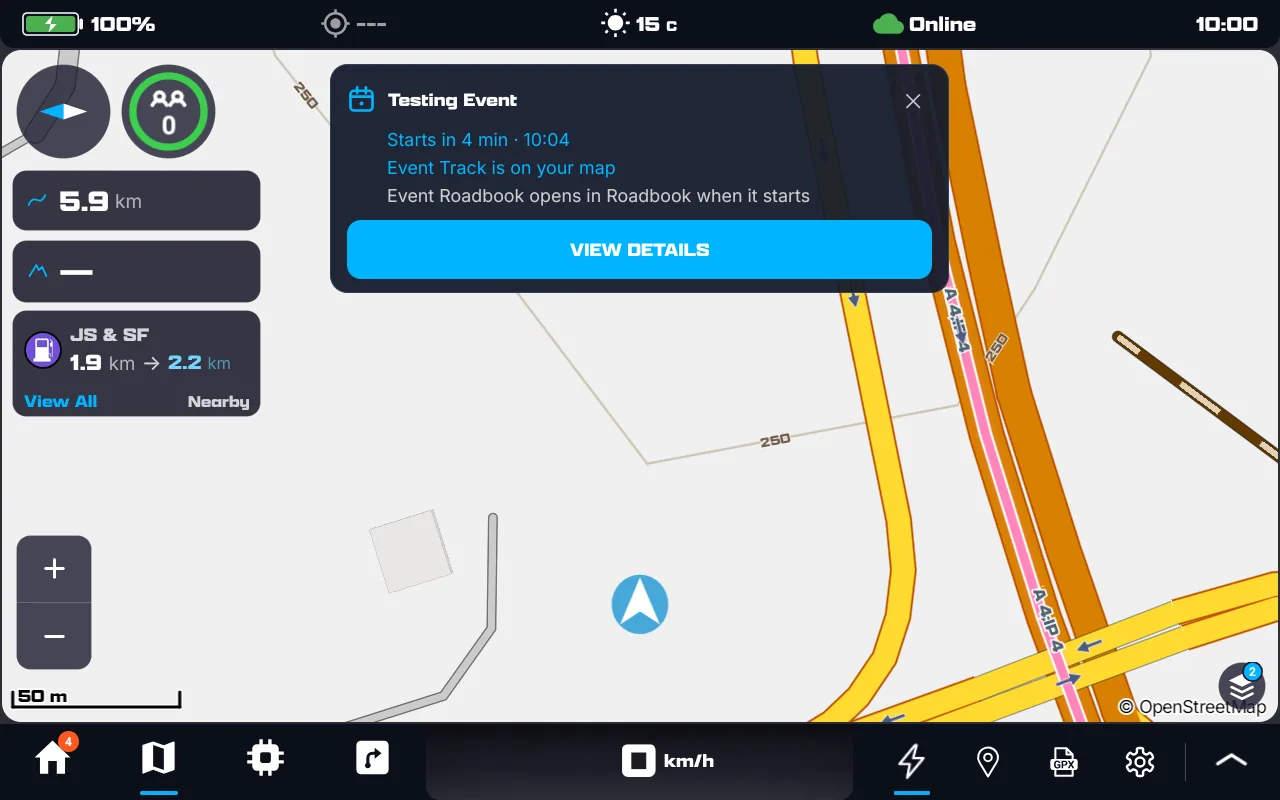
An event on a DMD dash: the reminder, and the roadbook ready for the start.
From 24 hours before the start, DMD2 reminds the rider of the event each time it opens, with what is on the unit already and what unlocks at the start.
Your track. Your roadbook.
Your feedback shapes what comes next. Every step is in the HUB Web manual.